SVN for WordPress.org & GitHub
Publish Plugins to WordPress.org
WordPress Plugin Publisher is a native MacOS application for building, validating, preparing, and publishing WordPress plugins to WordPress.org and GitHub.

The Easiest Way to Get Your Plugin on WordPress.org
From release packaging to SVN deployment, WordPress.org publishing,
repository preparation, and release verification
Publisher brings the entire workflow into one professional workspace.
Enjoy a 7 day free trial or purchase for $69 per year.
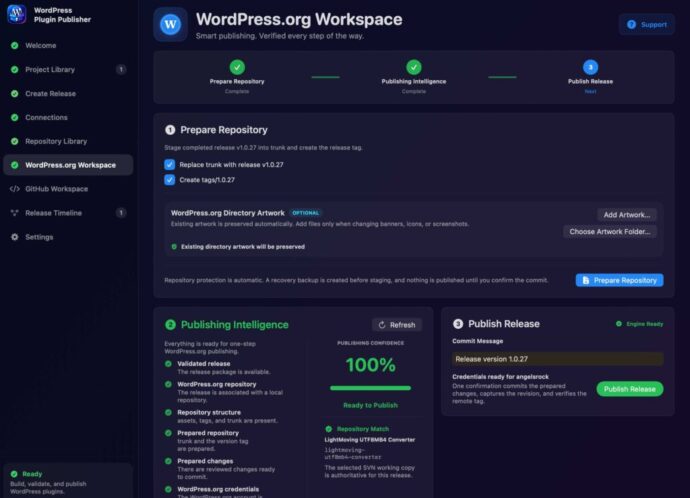
Wordpress Publishing
Once your plugin is approved, WordPress.org provides an SVN repository used to publish your plugin and future releases.
Publisher manages the WordPress.org SVN workflow for you.
It can prepare trunk, create version tags, preserve or update directory artwork, manage repository credentials, publish the release, and verify the result afterward.
GitHub Publishing
WordPress.org and GitHub—without mixing the workflows.
GitHub has its own dedicated publishing workspace.
Publisher can validate the repository, prepare the GitHub release, update README version information, place release notes into the changelog, tag, commit the changes, and publish the release.

The Simplest, Most Powerful Way to Update Plugins
No feature restrictions during your trial.
The Best SVN for Publishing to WordPress.org
Release Packaging
Build clean, verified plugin ZIPs ready for distribution.
WordPress.org SVN
Prepare trunk, tags, artwork, credentials, publishing, and verification.
GitHub Publishing
Prepare commits, README updates, changelogs, and releases from a dedicated workspace.
Publishing Intelligence
See exactly what is ready and what still requires attention.
Repository Library
Connect projects to their publishing destinations once and reuse them.
Release Timeline
Maintain a clear history of releases across your plugins.
WordPress Plugin Publisher is Built Around Your Plugins
Publishing Intelligence
Know when you’re ready to publish.
Publisher continuously evaluates the release, repository, documentation, credentials,
and publishing environment.
Instead of asking developers to remember every requirement, Publishing Intelligence turns release readiness into
something you can see.
Then show the 100% state:
100% — Ready to Publish

Update Plugins Easily
Your publishing workspace
remembers the project.
Project Library keeps your plugins organized.
Repository Library remembers
where they publish.
Connections securely manages
publishing access.
Release Timeline gives you a history
of what you’ve shipped.
Once a plugin is configured, subsequent releases become dramatically simpler.

WordPress SVN Client
From source code to published plugin.
WordPress Plugin Publisher guides each release through a clear publishing pipeline:
Create Release → Prepare Repository → Validate → Publish → Verify
No terminal commands.
No manually copying files into SVN.
No rebuilding release folders by hand.
No wondering if the repository is ready.
Publisher shows you before it’s published.

Publish a WordPress Plugin Without Wrestling With SVN
Publishing a plugin to WordPress.org requires more than uploading a ZIP file. Once your plugin is approved, WordPress.org provides an SVN repository used to publish your plugin and future releases.
WordPress Plugin Publisher turns that process into a guided macOS workflow. Connect your WordPress.org repository, prepare your release, update trunk, create the correct version tag, validate the repository, and publish—all from one application.
Whether you’re publishing your first WordPress plugin or maintaining multiple plugins, Publisher removes much of the repetitive SVN work while keeping the WordPress.org release structure intact.
Update Your Plugins with Easy SVN
Creating and managing Plugins has never been easier. When we create plugins, we need GitHub and a way to publish to WordPress.org. WordPress Plugin Publisher is created by a developer for developers.